Experiments
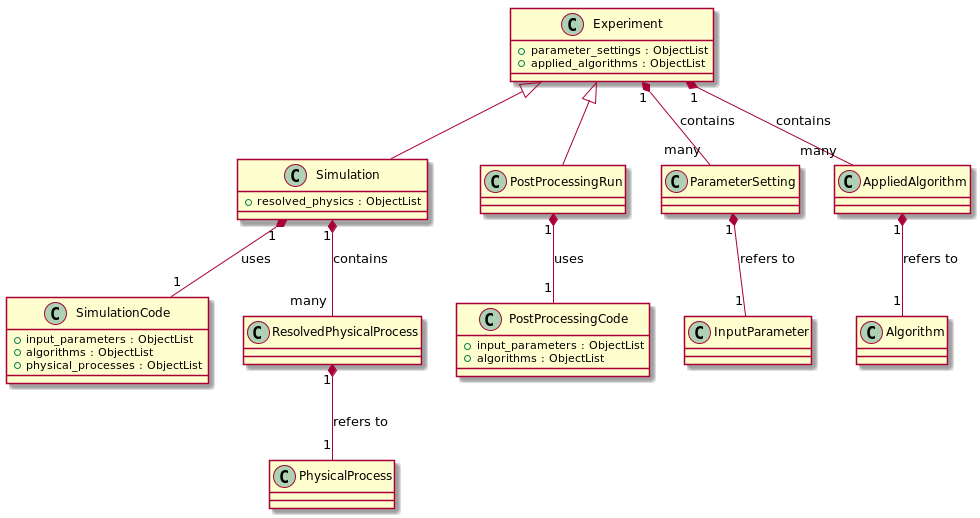
In the Simulation Datamodel vocabulary, a numerical Experiment produces or post-processes scientific data. It can
be of two types :
Simulation(usingSimulationCodeas Protocols),
PostProcessingRun(usingPostProcessingCodeas Protocols).
Any Experiment contains a set of AppliedAlgorithm and a set of
ParameterSetting. In addition, a Simulation
contains a set of ResolvedPhysicalProcess :
A strict binding is enforced between :
an Experiment’s
ParameterSettingand its Protocol’sInputParameter,an Experiment’s
AppliedAlgorithmand its Protocol’sAlgorithm,a
Simulation’sResolvedPhysicalProcessand itsSimulationCode’sPhysicalProcess.
For more details, see Strict protocol/experiment bindings.
Simulation
To define a Simulation, only two attributes are mandatory :
name : a non-empty string value,
simu_code : a
SimulationCodeinstance, (used to initialize theSimulation.simulation_codeproperty).
a Simulation has an execution_time
property that can be set to any string-formatted datetime following the %Y-%m-%d %H:%M:%S
format.
Here is a more complete example of a Simulation initialization with
all optional attributes :
>>> from astrophysix.simdm.protocol import SimulationCode
>>> from astrophysix.simdm.experiment import Simulation
>>>
>>> enzo = SimulationCode(name="", code_name="ENZO", code_version="2.6", alias="ENZO_26,
...                       url="https://enzo-project.org/",
...                       description="This is a fair description of the ENZO AMR code")
>>> simu = Simulation(simu_code=enzo, name="Cosmological simulation",
...                   alias="SIMU_A", description="Simu description",
...                   execution_time="2020-09-15 16:25:12",
...                   directory_path="/path/to/my/project/simulation/data/")
Warning
Setting the Simulation.alias property is necessary only if
you wish to upload your study on the Galactica simulation database. See Why an alias ? and
How can I check validity for Galactica ?
Post-processing run
Once a Simulation has been defined, you can add a
PostProcessingRun into it, to initialize one, only two attributes are mandatory :
name : a non-empty string value,
ppcode : a
PostProcessingCodeinstance, (used to initialize thePostProcessingRun.postpro_codeproperty).
Here is a more complete example of how to initialize a PostProcessingRun with all
optional attributes and add it into a Simulation :
>>> from astrophysix.simdm.protocol import PostProcessingCode
>>> from astrophysix.simdm.experiment import PostProcessingRun
>>>
>>> hop = PostProcessingCode(name="Hop", code_name="HOP")
>>> pprun = PostProcessingRun(name="Overdense structure detection", ppcode=hop,
...                           alias="HOP_DETECTION"
...                           description="This is the description of my HOP post-processing " \
...                                       "run to detect overdense gas structures in " \
...                                       "the star-forming ISM.",
...                           directory_path="/path/to/my/hop_catalogs")
>>> simu.post_processing_runs.add(pprun)
Warning
Setting the PostProcessingRun.alias property is
necessary only if you wish to upload your study on the Galactica simulation database. See
Why an alias ? and How can I check validity for Galactica ?
Parameter settings
To define the value you used for an input parameter of your code in a given
Simulation (or PostProcessingRun), you
can define a ParameterSetting. To do so, you must :
make a reference to the associated code
InputParameter: input_param attribute,give a value (
float,int,string,bool) : value attribute,Optionally, you can set a visibility flag :
ParameterVisibility(default toBASIC_DISPLAY), only used by the Galactica web app., for display purposes.
Available parameter setting visibility options are :
Finally, use the parameter_settings property to add it into your run.
Here is an example :
>>> from astrophysix.simdm.experiment import ParameterSetting
>>>
>>> set_levelmin = ParameterSetting(input_param=ramses.input_parameters['Lmin'],
...                                 value=8,
...                                 visibility=ParameterVisibility.ADVANCED_DISPLAY)
>>> simu.parameter_settings.add(set_levelmin)
>>> set_levelmax = simu.parameter_settings.add(ParameterSetting(input_param=lmax,
...                                                             value=12))
Warning
A ParameterSetting is strictly bound to its Experiment’s
Protocol’s InputParameter instance, see Strict protocol/experiment bindings
for details.
Optionally, you can attach a configuration file containing all the parameter settings of any
Simulation (or PostProcessingRun), using
the configuration_file property :
>>> import os
>>> from astrophysix.simdm.datafiles.file import YamlFile, JsonFile, AsciiFile
>>>
>>> # Set an ASCII configuration file to the simulation
>>> ini_cfg_filepath = os.path.join("/proj", "runs", "config_MHD_3D.ini")
>>> simu.configuration_file = AsciiFile.load_file(ini_cfg_filepath)
>>>
>>> # Reset configuration file => remove the ASCII file from astrophysix study.
>>> simu.configuration_file = None
For more details, see Attached files.
Warning
Only configuration file of type JSON_FILE,
YAML_FILE or
ASCII_FILE are accepted.
Applied algorithms
To define which algorithms were enabled in a given simulation (or post-processing) run and what were their implementation
details, you can define a AppliedAlgorithm. To do so, you must :
make a reference to the associated code
Algorithm: algorithm attribute,optionally provide an implementation details (
string) : details attribute.
Finally, use the applied_algorithms property to add it into your run.
Here is an example :
>>> from astrophysix.simdm.experiment import AppliedAlgorithm
>>>
>>> app_amr = AppliedAlgorithm(algorithm=ramses.algorithms[AlgoType.AdaptiveMeshRefinement.name],
...                            details="Fully threaded tree AMR implementation [Teyssier 2002].")
>>> ramses_simu.applied_algorithms.add(app_amr)
Warning
A AppliedAlgorithm is strictly bound to its Experiment’s
Protocol’s Algorithm instance, see Strict protocol/experiment bindings
for details.
Resolved physical processes (for Simulation only)
To define which physical processes were resolved in a given simulation run and what were their implementation
details, you can define a ResolvedPhysicalProcess. To do so, you must :
make a reference to the associated
SimulationCode’sPhysicalProcess: physics attribute,optionally provide an implementation details (
string) : details attribute.
Finally, use the resolved_physics property to add it into your run.
Here is an example :
 >>> from astrophysix.simdm.experiment import ResolvedPhysicalProcess
 >>>
 >>> res_sf = ResolvedPhysicalProcess(physics=ramses.physical_processes[Physics.StarFormation.name],
 ...                                  details="Star formation specific implementation")
 >>> simu.resolved_physics.add(res_sf)
 >>> res_sgrav = ResolvedPhysicalProcess(physics=ramses.physical_processes[Physics.SelfGravity.name],
                                         details="Self-gravity implementation (gas + particles)"))
>>> simu.resolved_physics.add(res_sgrav)
Warning
A ResolvedPhysicalProcess is strictly bound to its
Simulation’s SimulationCode’s
PhysicalProcess instance, see Strict protocol/experiment bindings
for details.
Parametric studies
New in version 0.7.0.
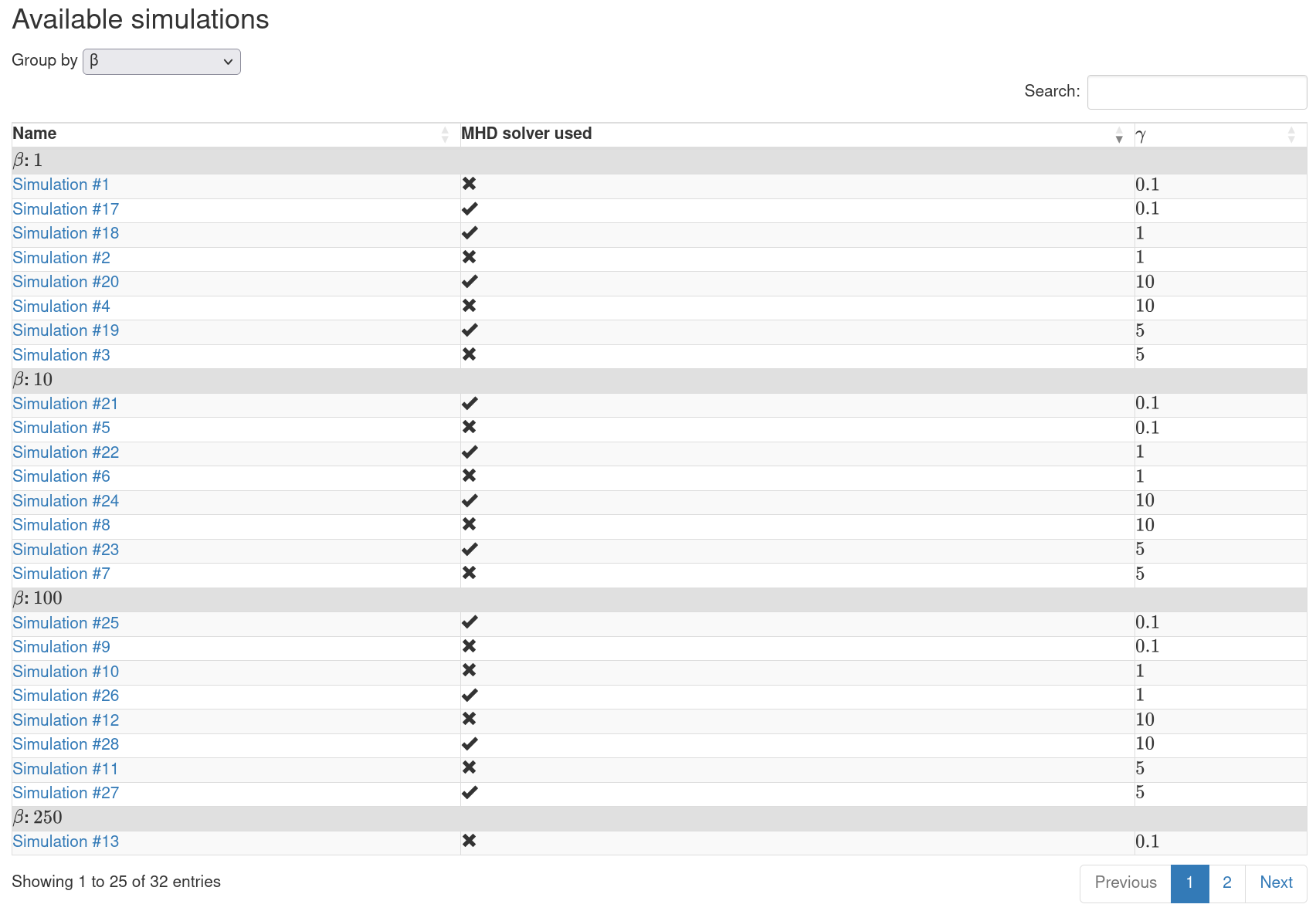
In some use cases, a large number of numerical experiments are conducted to explore a multi-dimensional parameter space. You can define which input parameters are part of your parameter space exploration to enhance the simulation list display on your Galactica project page.
This way, your simulations will be displayed in a sortable datatable with pagination functionality if the number of simulations is too large.
For example, a project where pure hydro and MHD runs are executed with different values of some parameter \(\beta\) and \(\gamma\) :
>>> from astrophysix.simdm import Project
>>> from astrophysix.simdm.protocol import SimulationCode
>>> from astrophysix.simdm.protocol import InputParameter
>>>
>>> proj = Project(category="COSMOLOGY", project_title="Project Epsilon",
...                alias="EPSILON")
>>> dyablo = SimulationCode(name="Dyablo 1.0", code_name="DYABLO",
...                         alias="DYABLO_CODE")
>>> # Add input parameters
>>> used_mhd_solver = InputParameter(key="with_mhd", name="MHD solver used",
...                                  description="Pure hydro or MHD run ?")
>>> dyablo.input_parameters.add(used_mhd_solver)
>>> beta = InputParameter(key="beta", name="$\\beta$",
...                       description="$\\beta$ parameter")
>>> dyablo.input_parameters.add(beta)
>>> gamma = InputParameter(key="gamma", name="$\gamma$",
...                       description="$\gamma$ parameter")
>>> dyablo.input_parameters.add(gamma)
with several simulations included in the project, each one with a different set of parameter values :
>>> from astrophysix.simdm.experiment import ParameterSetting
>>> from astrophysix.simdm.experiment import Simulation
>>>
>>> # Define parameter settings in the parameter space
>>> use_hydro = ParameterSetting(input_param=used_mhd_solver, value=False)
>>> use_mhd = ParameterSetting(input_param=used_mhd_solver, value=True)
>>> beta_001 = ParameterSetting(input_param=beta, value=1.0)
>>> beta_010 = ParameterSetting(input_param=beta, value=10.0)
>>> beta_100 = ParameterSetting(input_param=beta, value=100.0)
>>> beta_250 = ParameterSetting(input_param=beta, value=250.0)
>>> gamma_001 = ParameterSetting(input_param=gamma, value=0.1)
>>> gamma_010 = ParameterSetting(input_param=gamma, value=1.0)
>>> gamma_050 = ParameterSetting(input_param=gamma, value=5.0)
>>> gamma_100 = ParameterSetting(input_param=gamma, value=10.0)

>>> num_simu = 1
>>> # Add simulations with defined parameter settings in the project
>>> for solver in [use_hydro, use_mhd]:
...     for bval in [beta_001, beta_010, beta_100, beta_250]:
...         for gval in [gamma_001, gamma_010, gamma_050, gamma_100]:
...             simu_name = "Simulation #{i:d}".format(i=num_simu)
...             s = Simulation(dyablo, name=simu_name,
...                            alias="SIMU_{i:d}".format(i=num_simu))
...             s.parameter_settings.add(solver)
...             s.parameter_settings.add(bval)
...             s.parameter_settings.add(gval)
...             proj.simulations.add(s)
...
...             num_simu += 1
You can then insert the corresponding input parameters of your parametric study in the
simu_datatable_params parameter of your Project :
>>> # Add input parameters in project simulation datatable parameter list
>>> proj.simu_datatable_params.add(used_mhd_solver)
>>> proj.simu_datatable_params.add(beta)
>>> proj.simu_datatable_params.add(gamma)
When this project is uploaded on Galactica, the list of simulations appear as a datatable :
Strict protocol/experiment bindings
When you manipulate Experiment class objects (Simulation or
PostProcessingRun) and Protocol class objects
(SimulationCode or PostProcessingCode) and
when you link objects together, astrophysix makes sure for you that your entire study hierarchical structure remains
consistent at all times :
upon object creation,
upon object addition into another object,
upon object deletion from another object.
Upon object creation
You are free to create any kind of astrophysix object, even those linked to another object :
>>> from astrophysix.simdm.protocol import InputParameter
>>> from astrophysix.simdm.experiment import ParameterSetting
>>>
>>> lmin = InputParameter(key="levelmin", name="Lmin", description="min. level of AMR refinement"))
>>> set_levelmin = ParameterSetting(input_param=lmin, value=9))
There is no risk of breaking your study hierarchical structure consistency.
Upon object addition
To avoid dangling references into the study hierarchical structure, astrophysix will prevent you from :
Adding a
ParameterSettingobject into theparameter_settingslist of an Experiment if its associatedInputParameterdoes not already belong to the Experiment’s Protocol’sinput_parameterslist,Adding a
AppliedAlgorithmobject into theapplied_algorithmslist of an Experiment if its associatedAlgorithmdoes not already belong to the Experiment’s Protocol’salgorithmslist,Adding a
ResolvedPhysicalProcessobject into theresolved_physicslist of aSimulationif its associatedPhysicalProcessdoes not already belong to theSimulation’sSimulationCode’sphysical_processeslist.
I know it is a bit convoluted, let’s see an example :
>>> from astrophysix.simdm.protocol import SimulationCode, InputParameter, Algorithm, \
                                           PhysicalProcess, AlgoType, Physics
>>> from astrophysix.simdm.experiment import Simulation, ParameterSetting, \
                                             AppliedAlgorithm, ResolvedPhysicalProcess
>>>
>>> amr_code = SimulationCode(name="My AMR code", code_name="Proto_AMR")
>>> simu = Simulation(simu_code=amr_code, name="My test run")

>>> # ------------------- Input parameters ------------------------------
>>> lmin = InputParameter(key="levelmin", name="Lmin")
>>> set_levelmin = ParameterSetting(input_param=lmin, value=9)
>>> simu.parameter_settings.add(set_levelmin) # => Error
AttributeError: Simulation '[Lmin = 9] parameter setting' does not refer
to one of the input parameters of '[My AMR code] simulation code'.
>>>
>>> # Add first the input parameter into the code,
>>> amr_code.input_parameters.add(lmin)
>>> # THEN add the parameter setting into the simulation.
>>> simu.parameter_settings.add(set_levelmin) # => Ok
>>> # -------------------------------------------------------------------
>>>
>>> # ------------------- Applied algorithms ----------------------------
>>> amr_algo = Algorithm(algo_type=AlgoType.AdaptiveMeshRefinement)
>>> app_amr = AppliedAlgorithm(algorithm=amr_algo)
>>> simu.applied_algorithms.add(app_amr) # Error
AttributeError: Simulation '[Adaptive mesh refinement] applied algorithm'
does not refer to one of the algorithms of '[My AMR code] simulation code'.
>>>
>>> # Add first the algorithm into the code
>>> amr_code.algorithms.add(amr_algo)
>>> # THEN add the applied algorithm  into the simulation
>>> simu.applied_algorithms.add(app_amr)
>>> # -------------------------------------------------------------------
>>>
>>> # ---------------- Resolved physical processes ----------------------
>>> sf_process = PhysicalProcess(physics=Physics.StarFormation)
>>> res_sf = ResolvedPhysicalProcess(physics=sf_process)
>>> simu.resolved_physics.add(res_sf) # Error
AttributeError: Simulation '[Star formation] resolved physical process'
does not refer to one of the physical processes of '[My AMR code] simulation code'.
>>>
>>> # Add first the physical process into the code
>>> amr_code.physical_processes.add(sf_process)
>>> # THEN add the resolved physical process into the simulation
>>> simu.resolved_physics.add(res_sf)
>>> # -------------------------------------------------------------------
Upon object deletion
To avoid missing references into the study hierarchical structure, astrophysix will also prevent you from :
Deleting a
InputParameterobject from a Protocol’sinput_parameterslist if any Experiment associated to that Protocol contains aParameterSettingthat refers to the input parameter to be deleted,Deleting a
Algorithmobject from a Protocol’salgorithmslist if any Experiment’s associated to that Protocol contains aAppliedAlgorithmthat refers to the algorithm to be deleted,Deleting a
PhysicalProcessobject from aSimulationCode’sphysical_processeslist if anySimulationassociated to thatSimulationCodecontains aResolvedPhysicalProcessthat refers to the physical process to be deleted.
I know it is a bit convoluted, let’s see an example :
>>> from astrophysix.simdm.protocol import SimulationCode, InputParameter, Algorithm, \
                                           PhysicalProcess, AlgoType, Physics
>>> from astrophysix.simdm.experiment import Simulation, ParameterSetting, \
                                             AppliedAlgorithm, ResolvedPhysicalProcess
>>> amr_code = SimulationCode(name="My AMR code", code_name="Proto_AMR")
>>> simu = Simulation(simu_code=amr_code, name="My test run")
>>>
>>> # ------------------- Input parameters ------------------------------
>>> lmin = InputParameter(key="levelmin", name="Lmin")
>>> amr_code.input_parameters.add(lmin)
>>> set_levelmin = ParameterSetting(input_param=lmin, value=9)
>>> simu.parameter_settings.add(set_levelmin)
>>> del amr_code.input_parameters[lmin]
AttributeError: '[levelmin] 'Lmin' input parameter' cannot be deleted, the following items depend
on it (try to delete them first) : ['My test run' simulation [Lmin = 9] parameter setting].
>>>
>>> # Delete the parameter setting from the simulation first,
>>> del simu.parameter_settings[set_levelmin]
>>> # THEN delete the input parameter from the code.
>>> del amr_code.input_parameters[lmin] # => Ok
>>> # -------------------------------------------------------------------
>>>
>>> # ------------------- Applied algorithms ----------------------------
>>> amr_algo = Algortihm(algo_type=AlgoType.AdaptiveMeshRefinement)
>>> amr_code.algorithms.add(amr_algo)
>>> app_amr = AppliedAlgorithm(algorithm=amr_algo)
>>> simu.applied_algorithms.add(app_amr)
>>> del amr_code.algorithms[amr_algo]
AttributeError: ''Adaptive mesh refinement' algorithm' cannot be deleted, the following items depend
on it (try to delete them first) : ['My test run' simulation [Adaptive mesh refinement] applied algorithm].
>>>
>>> # Delete the applied algorithm from the simulation first,
>>> del simu.applied_algorithms[app_amr]
>>> # THEN delete the algorithms from the code
>>> del amr_code.algorithms[amr_algo] # => Ok
>>>
>>> # -------------------------------------------------------------------
>>>
>>> # ---------------- Resolved physical processes ----------------------
>>> sf_process = PhysicalProcess(physics=Physics.StarFormation)
>>> amr_code.physical_processes.add(sf_process)
>>> res_sf = ResolvedPhysicalProcess(physics=sf_process)
>>> simu.resolved_physics.add(res_sf)
>>> del amr_code.physical_processes[sf_process]
AttributeError: ''Star formation' physical process' cannot be deleted, the following items depend
on it (try to delete them first) : ['My test run' simulation [Star formation] resolved physical process].
>>>
>>> # Delete the resolved physical process from the simulation first
>>> del simu.resolved_physics[res_sf]
>>> # THEN delete the physical process from the code
>>> del amr_code.physical_processes[sf_process] # => Ok
>>> # -------------------------------------------------------------------